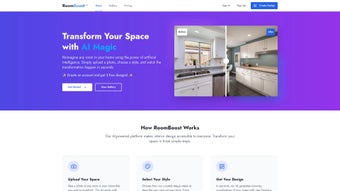

Download RoomBoost AI – AI‑Powered Interior Design Tool for Home & Professional Use
Introduction
In today’s fast‑moving design landscape, professionals and hobbyists alike are constantly searching for tools that can keep up with the demand for fresh ideas, accurate budgeting, and seamless collaboration. RoomBoost AI arrives at the perfect intersection of creativity and technology, offering a cloud‑native platform that harnesses advanced machine‑learning algorithms to generate interior design concepts in seconds. Whether you are a seasoned architect preparing a client presentation, a real‑estate marketer staging a property for sale, or a homeowner eager to visualize a new living‑room layout, this application promises to cut down the time‑to‑concept dramatically while preserving a high level of visual fidelity. The platform’s subscription model ensures continuous access to the latest AI models, a growing library of furniture and materials, and regular security updates, making it a future‑proof investment for anyone serious about design. In the following sections, we will explore the core capabilities, installation workflow, system compatibility, and the pros and cons that shape the overall user experience, giving you a comprehensive picture before you decide to download and start designing.
Overview
RoomBoost AI is a web‑based, subscription‑driven platform that brings artificial intelligence to the world of interior design. Whether you are a seasoned designer, a real‑estate professional, or a DIY enthusiast looking to refresh a single room, the tool offers a data‑driven, personalized approach to visualizing and planning spaces. By feeding the system with simple inputs—room dimensions, style preferences, budget limits, and functional requirements—RoomBoost AI’s advanced algorithms generate multiple design concepts that balance aesthetics, ergonomics, and cost efficiency.
The platform’s strength lies in its ability to quickly explore dozens of layout permutations, color palettes, furniture arrangements, and lighting schemes without the need for extensive manual sketching or costly render farms. While it does not replace the creative intuition of a human designer, it serves as a powerful assistant, delivering instant, data‑backed inspiration that can accelerate the design process, reduce client‑review cycles, and ultimately lead to more confident decision‑making. Secure cloud storage, regular updates, and a responsive support team ensure that users receive a reliable, future‑proof solution for every project, from a single apartment makeover to a full‑scale commercial renovation.
In addition, the platform integrates with popular project‑management tools, allowing designers to embed design boards directly into client portals or internal workflows, further streamlining communication and approval steps.
Key Features of RoomBoost AI
The feature set of RoomBoost AI has been carefully curated to address the most common pain points faced by interior designers and their clients. From rapid concept generation to detailed cost breakdowns, each function works in harmony to provide a holistic design experience. Below is a comprehensive list of what you can expect when you sign up for the service.
- AI‑Generated Design Options: Instantly produces 10‑30 curated layouts based on user‑provided constraints, each complete with furniture placement, color schemes, and lighting suggestions.
- Budget Optimization Engine: Calculates realistic cost estimates and suggests cost‑saving alternatives without compromising style, pulling pricing data from a network of verified suppliers.
- Style Personality Quiz: Interactive questionnaire that captures aesthetic preferences (mid‑century, minimalist, rustic, etc.) and feeds them directly into the AI model.
- Real‑Time 3D Visualization: Browser‑based rendering lets users walk through proposals in a virtual environment, with support for VR headsets for an immersive experience.
- Material & Furniture Library: Access to a curated catalog of over 5,000 items from partner manufacturers, including detailed specifications, material swatches, and sustainability ratings.
- Space‑Efficiency Analyzer: Evaluates traffic flow, natural light usage, and ergonomics for each layout, highlighting potential bottlenecks and improvement areas.
- Collaboration Hub: Share projects with clients or team members, collect feedback, and iterate in a single workspace; comments are timestamped and version‑controlled.
- Regular Algorithm Updates: Machine‑learning models are retrained monthly to incorporate the latest design trends, market pricing fluctuations, and user‑generated data.
- Secure Cloud Sync: All projects are automatically backed up, ensuring no loss of work across devices, with end‑to‑end encryption both in transit and at rest.
- Multi‑Language Support: Interface available in English, Spanish, French, German, and Mandarin, making it accessible to a global audience.
Beyond the bullet‑pointed capabilities, RoomBoost AI also offers a set of auxiliary tools such as a mood‑board generator, a material cost calculator, and an export function that converts designs into industry‑standard formats like OBJ, FBX, and even PDF presentation decks. These additional utilities make it easier for designers to incorporate AI‑generated concepts into existing workflows without having to switch between multiple software packages.
Installation, Usage & Compatibility
Because RoomBoost AI is a cloud‑native service, there is no traditional installation process. Users simply create an account on the official website, choose a subscription tier (monthly or annual), and start designing directly from any modern web browser. The platform is optimized for Chrome, Edge, Firefox, and Safari, ensuring smooth performance on both desktop and mobile devices. For users who prefer a dedicated workspace, a lightweight Progressive Web App (PWA) can be added to the home screen on Windows, macOS, Android, or iOS, delivering an app‑like experience with offline caching of project data.
Getting Started: After registration, a quick onboarding wizard guides you through importing room dimensions (manually, via a PDF floor plan, or by uploading a simple SketchUp file). Next, the style quiz refines the AI’s understanding of your aesthetic taste. Finally, you set a budget range and any functional constraints (e.g., pet‑friendly flooring, wheelchair access). Within seconds, the engine produces a gallery of design concepts that you can filter, compare, and edit. The interface includes drag‑and‑drop controls for furniture, a color picker with HEX and RGB values, and a lighting module that simulates natural daylight based on geographic location.
System Requirements: RoomBoost AI runs on any device with an internet connection and a minimum of 4 GB RAM. For optimal 3D rendering, a GPU‑accelerated browser is recommended, though the platform gracefully falls back to CPU rendering on lower‑spec machines. Because all heavy computation occurs on remote servers, even older laptops can generate high‑quality designs without lag. The service also supports integration with cloud storage providers such as Google Drive, Dropbox, and OneDrive for easy import and export of assets.
Compatible Operating Systems: Windows 10/11, macOS 12 Catalina and later, Linux (via Chromium‑based browsers), Android 9 +, iOS 13 +.
Support & Updates: Subscribers receive automatic updates as new features are rolled out. A knowledge base, video tutorials, and live chat support are available 24/7. The subscription also includes quarterly webinars where the development team showcases upcoming AI improvements and answers user questions. For enterprise customers, a dedicated account manager is assigned to assist with custom integrations, branding, and on‑boarding of large design teams.
Pros, Cons & Overall Assessment
Pros
- Rapid generation of multiple design concepts saves hours of manual drafting.
- Budget‑aware suggestions keep projects financially realistic.
- Cloud‑based storage guarantees access from any device.
- High‑quality 3D visualizations enhance client presentations.
- Extensive furniture library reduces the need for external sourcing.
- Regular AI model updates keep the platform on‑trend.
- Collaboration tools streamline feedback loops.
- Multi‑language interface broadens global usability.
- Export options support industry‑standard file formats for downstream editing.
- Secure encryption and GDPR/CCPA compliance protect user data.
Cons
- Subscription cost may be a barrier for hobbyists on a tight budget.
- Learning curve for the advanced analytics dashboard.
- Reliance on internet connectivity; offline work is limited to cached data.
- AI suggestions sometimes favor popular trends over niche personal styles.
- Limited integration with some professional CAD software (e.g., AutoCAD).
- Exported 3D models may require additional cleanup before use in high‑end renderers.
- Initial onboarding questionnaire can feel lengthy for quick‑fire projects.
RoomBoost AI stands out as one of the most intuitive AI‑driven interior design platforms currently available. Its ability to blend aesthetic recommendation with realistic budgeting makes it an indispensable ally for both professionals and design‑savvy homeowners. While the subscription fee may deter casual users, the time saved and the quality of output justify the investment for serious projects.
Conclusion & Frequently Asked Questions
In a market saturated with generic mood‑board apps, RoomBoost AI delivers a truly intelligent experience that respects both creative vision and practical constraints. By automating the heavy lifting of layout planning and cost estimation, the platform empowers designers to focus on what they do best—crafting beautiful, functional spaces. The secure cloud environment, continuous AI enhancements, and robust collaboration hub make it a compelling choice for anyone looking to streamline the design workflow.
Whether you are preparing a client pitch, redesigning your own living room, or seeking fresh ideas for a commercial renovation, RoomBoost AI offers a secure, constantly updated, and visually compelling solution. Ready to transform your space? Start your free trial today and see how AI can elevate your design workflow.
FAQ
Is RoomBoost AI a standalone design software?
RoomBoost AI is a web‑based platform that complements existing design tools. It does not replace professional CAD or BIM software but provides AI‑generated concepts that can be exported for further refinement.
Can I use RoomBoost AI on a mobile device?
Yes. The platform is fully responsive and works in modern browsers on Android and iOS. A PWA version can also be installed for an app‑like experience.
How does the budgeting feature calculate costs?
RoomBoost AI pulls pricing data from partnered manufacturers and online retailers. It then applies regional cost modifiers and the user‑specified budget range to suggest affordable alternatives.
Is my project data secure?
All data is encrypted in transit (TLS 1.3) and at rest. Projects are stored in secure cloud servers with regular backups and compliance with GDPR and CCPA standards.
What subscription plans are available?
RoomBoost AI offers a Basic plan ($19/month) for hobbyists, a Professional plan ($49/month) with advanced analytics, and an Enterprise tier (custom pricing) for agencies and large firms.






